Animation Freezes
Animation freeze
Unfortunately the game have animation freezing problems, all animations that freezes the game depends on your hardware it seems. Some patrons have told me that they've never experienced any problems at all while others claim that certain animation freezes, I have experienced them myself. This is what I know:
- The size of the animation is not the cause of the freeze, a bigger animation can still play while a smaller sized might freeze.
- The amount of animations in the game does not cause the problem, the very same animation freezes in a completely new project with only one image and one animation.
- The time put into the game session is not the cause, the game freeze on a freshly started game.
The solution is still not known and I would be very happy if I'd ever find it. Please send me a message if you never experience the freezes and what you did fix it.
To unfreeze an animation follow the steps below. (Doesn't work for everyone)
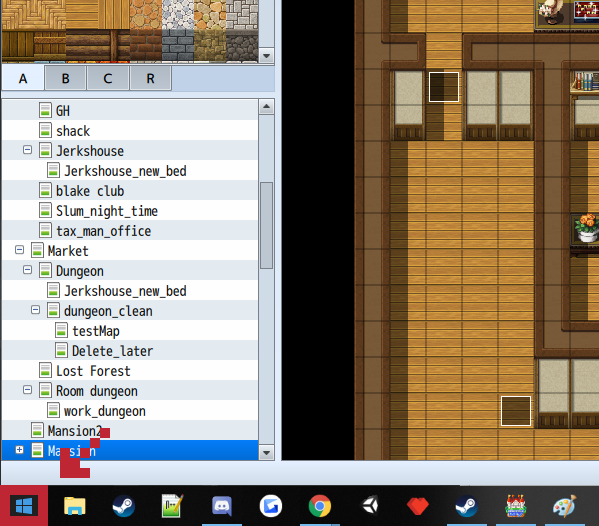
Right click the window logo on your task bar.
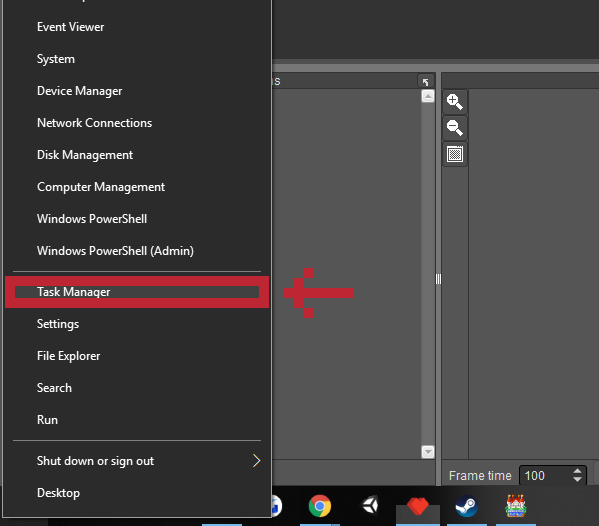
Left click the task manager and the animation just magically unfreezes. I have no clue why this works but it does. You cannot start the task manager in any other way. This might also only work on Windows 10, not tested on any other versions of Windows.
Try changing your default media player to the default which comes with the OS. To do that follow these steps.
- Search for default apps in the search task bar.
- Select video player
- Select movies and tv. Windows should already have some text there mentioning it's the recommended app.